|
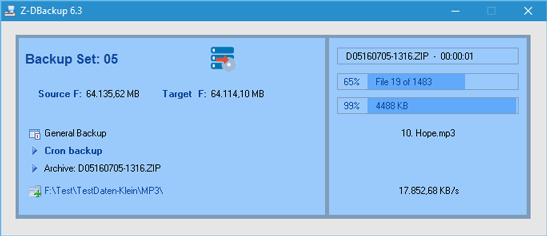
After you have created a backup set, you can run it and create a backup. When you start the backup, the Z-DBackup shrinks to working size, i.e. the list of backup sets is hidden. The program first compiles the file list for the backup and then creates the backup archive. You can monitor the current status in the progress displays.
You can abort the backup process at any time by clicking the X button. Already created files (e.g. in multi-spanning mode) are then deleted.
 You can can only restore your operating system to a working state using a Image Backup You can can only restore your operating system to a working state using a Image Backup .png)
Backup Settings
•Settings Window
•Backup Name and Medium
•Backup to NAS
•Backup to USB
•Backup to DVD-RAM
•Backup to Tape
•Backup Target - ZIP
•Backup Target - COPY
•Backup Target - TAPE
•Tape and Burner
•FTP
•Registry
•Delete old backups
All used trademarks and company names are subject to copyright of their respective companies.
|