|
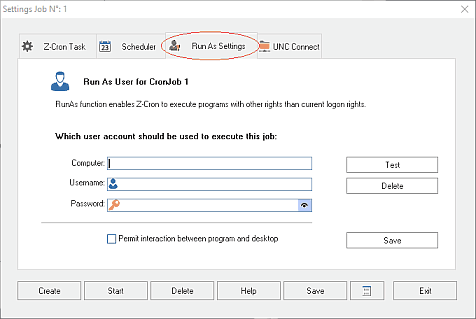
The RunAs function enables Z-Cron to start programs with other rights. If Z-Cron is running as a service, the started applications will be running hidden because there is no connection between the service and the desktop.
 In order for these settings to be activated you have to select the option Run As Job on the tap Z-Cron Task. Note that not all Z-Cron Tools support the Run As Job option. In order for these settings to be activated you have to select the option Run As Job on the tap Z-Cron Task. Note that not all Z-Cron Tools support the Run As Job option.
User Account Settings
|
Computer:
|
Computer or Domain
|
|
Username:
|
User
|
|
Password:
|
Windows Password
|
|
Using the Test button you can test your password settings and with the Save button you can save the RunAs settings.
If this computer is not in a domain, it is usually not necessary to fill in the "Computer" field. If you are not sure, just leave it empty.
It is always a good idea to create and use special service accounts and not the administrator account, because it makes changing the admin password much easier.
Allow interaction between program and desktop
If Z-Cron is running as a Windows service, programs started by the service usually cannot display windows on the logged-on user's desktop. This is a Windows security restriction and is caused by service isolation.
The option "Permit interaction between program and desktop" attempts to allow desktop interaction where Windows still permits it. However, this is a legacy Windows function, and success cannot be guaranteed.
This setting does not replace or change the RunAs settings. It is intended only for special cases where desktop interaction is explicitly required. For normal use of Z-Cron, this option should usually remain disabled. If a program window must be displayed on the user's desktop, the job should be started in the logged-on user session, for example via the Z-Cron client.
All mentioned trademarks and company names are subject to the Copyright of their respective owners.
|