|
You can execute Z-Cron jobs at your PC at home by sending an e-mail from a remote location.
Z-Cron can check the inbox of an e-mail account in regular intervals and react to e-mail with a certain subject. According to the subject a certain Z-Cron job, that you have previously created, will be executed. If you want to use this feature you can enter the needed account details in the POP3 Tab of the Settings, to let Z-Cron gain access to the inbox of an e-mail account. You will also set up a password that every e-mail subject has to contain, in order for Z-Cron to react to the e-mail.
It is recommended to set up a dedicated e-mail account that will only be used with Z-Cron for this service. Large inboxes with a couple of hundred or thousand e-mails will slow down the e-mail scanning of Z-Cron considerably.
|
POP3 Server
|
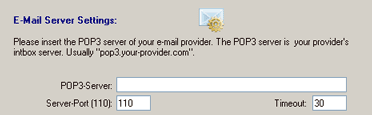
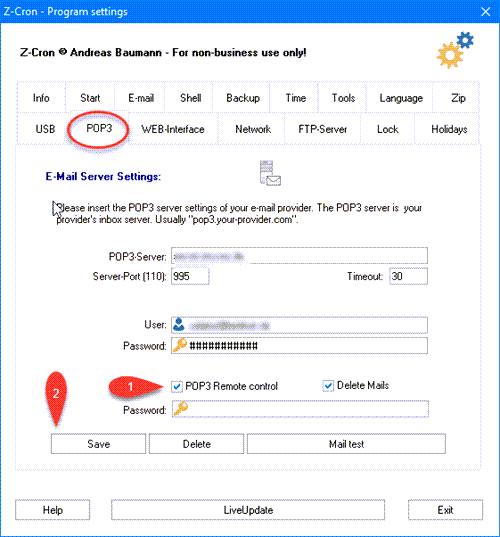
POP3-Server: The POP3 Server address of your e-mail provider (e.g. pop.gmail.com). Consult your e-mail provider for the correct settings.
Server-Port: The port of the POP3 server.
The default port for unencrypted transmission is 110.
The default port for encrypted transmissions is 995.
Timeout: The maximum time in seconds to wait for a response from the server.
User: Your username for your e-mail account. (usually your e-mail address)
Password: The password for your e-mail account.
POP3 Remote control: If this option is ticked, Z-Cron will check the inbox of your e-mail account for messages it should react to, at a certain interval. If you deactivate this option, Z-Cron will stop checking your inbox without having to delete the inserted server settings.
Z-Cron will check the inbox every 20 minutes by default. Precisely every hour at: xx:02, xx:22, and xx:42 o'clock.
Delete Mails: If this option is ticked, Z-Cron will delete every e-mail in the inbox after fetching e-mails it should react to. By doing so your inbox will always be empty after every fetch, and can't get cluttered with spam or other e-mails that don't have to do with Z-Cron. Only use this option if the inbox is solely used for the control of Z-Cron.
Z-Cron will automatically delete e-mails it reacts to, even if this option is not ticked.
Password: This password is the password every e-mail subject has to begin with in order for Z-Cron to react to the e-mail.
Your can choose this password.
Don't forget to hit Save to save the settings you inserted.
Which e-mails will Z-Cron react to?
The e-mail subject has to begin with the password you chose, followed by a hyphen and the number of the Z-Cron job that should be started.
Example:
You picked "MyPass1" as your password for the e-mail subject.
You can now start the Z-Cron job number 1 by sending an e-mail with the subject "MyPass1-001". Z-Cron only checks the e-mail subject and discards other text in the e-mail.
All mentioned trademarks and company names are subject to the Copyright of their respective owners.
|