|
|

|
A context sensitive help feature is available within Z-Cron. If you need help with a setting or dialog window, just press the F1 key and a help page for the window will appear. Z-Cron uses the Microsoft� HTML-based help system.
|
|
Function keys in the main window
|
|

|
Especially for the Remote Desktop Connection, the F5 key moves the Z-Cron program window to the upper left corner of the monitor.
|
Z-Cron offers the possibility to automatically start programs at certain defined times. Three conditions have to be granted:
Your computer must be running when a job should be started.
Z-Cron has been activated either manually or automatically, for example by the program group "Startup" or has been started as a service.
Window arrangement
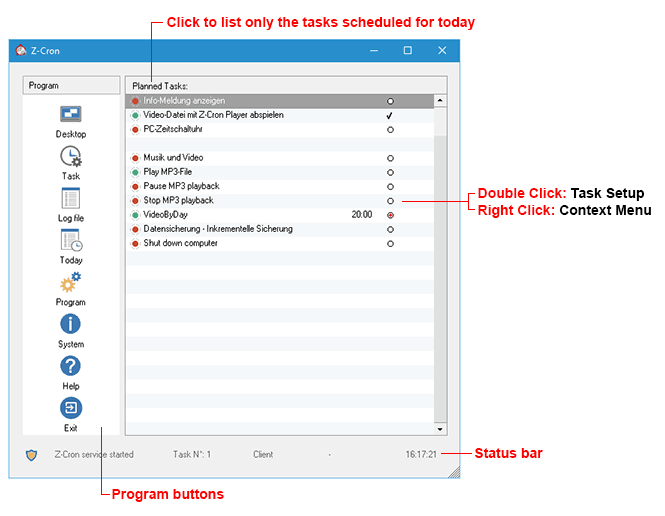
Z-Cron's main window shows a list of the defined jobs and information for each job.
The names of the defined jobs are shown in the left part of the job window (job name), while information about the current states of the jobs are shown in the right part.
Context menu
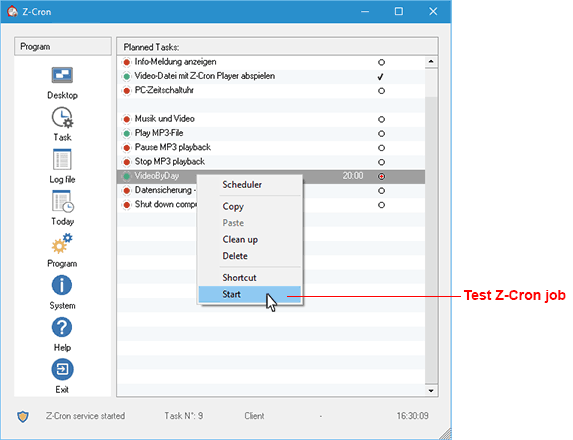
By right-clicking a job's label, the context menu for the selected task will be shown. You can create a desktop icon (Shortcut), inspect the scheduler settings, copy or delete the selected task.
•Shortcut: You can create a desktop icon (Shortcut), to start the job manually.
•Start: Starts the job from the Z-Cron service, if the service is running, otherwise from the current Z-Cron instance.
This option is perfect for testing new Z-Cron jobs, to see if the job has all the rights it needs when it's being startet automatically be the Z-Cron service.
Z-Cron program buttons
|

In the main window you can send Z-Cron to the system tray by using the Desktop button. The program won't be quit by this but remains activated as long as Windows isn't terminated.
|
|
|
|
.png)
Double-clicking the Z-Cron icon in the system tray recovers the main window.
|
|
|
|

To create a new job click on the button Task in the main window. The job settings window appears in which you can define the task. In this window you can also edit or delete existing tasks.
|
|
|
|

Shows the Z-Cron logfile.
|
|
|
|

Displays only the jobs that are scheduled for today in the list.
|
|
Program settings
|
|

Global Z-Cron program settings.
|
|
|
|

System Information and LiveUpdate.
|
All mentioned trademarks and company names are subject to the Copyright of their respective owners.
|