|
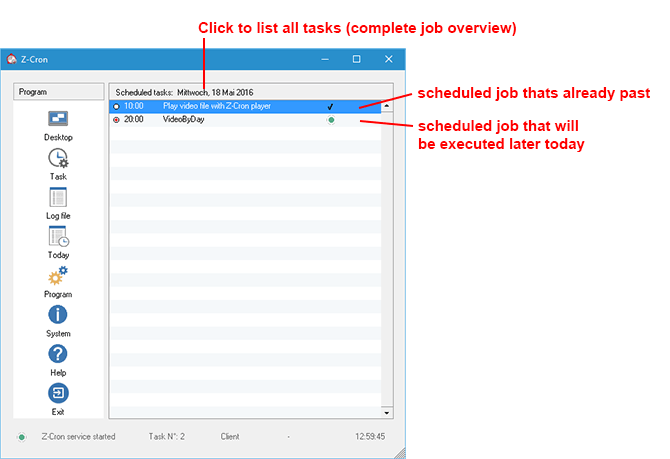
The window shows a listing of the tasks scheduled for the current day.
You can easily get an overview over the jobs that were already run and those which still have to be processed. A click on the title bar of the list ("Planned Tasks") switches the view back to the complete job overview.
The context menu is not available in this view.
Z-Cron program buttons
|

In the main window you can send Z-Cron to the system tray by using the Desktop button. The program won't be quit by this but remains activated as long as Windows isn't terminated.
|
|
|
|
.png)
Double-clicking the Z-Cron icon in the system tray recovers the main window.
|
|
|
|

To create a new job click on the button Task in the main window. The job settings window appears in which you can define the task. In this window you can also edit or delete existing tasks.
|
|
|
|

Shows the Z-Cron logfile.
|
|
|
|

Global Z-Cron program settings, for example SMTP and NTP servers.
|
All mentioned trademarks and company names are subject to the Copyright of their respective owners.
|