|
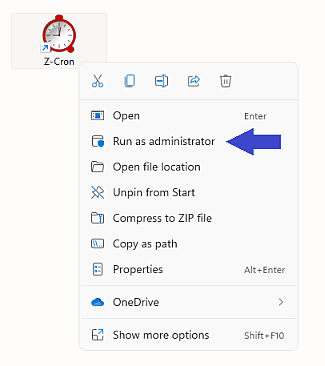
For the continuation of this process it is required that you execute the program as an administrator!Close the program and right-click the program icon. Select "Run as administrator" from the context menu. Simply logging in as an admin is not sufficient!
Since Windows Vista, even an administrator has only limited rights which are, for example, not sufficient for the registration process of Z-Cron. The reason for that is the User Account Control (UAC) in Windows. UAC divides special tasks from normal tasks. Some of the tasks which require special administrative rights are:
Installing software or partitioning hard disks.
To complete the registration process or set special program preferences, make a right-click on the Z-Cron desktop icon. Select "Run as administrator" from the context menu. This menu item is marked with a windows shield (on older versions of Windows).
All mentioned trademarks and company names are subject to the Copyright of their respective owners.
|